5.0
Reviewed Aug 26, 2026The step-by-step approach makes the interface and modeling tools easy to understand.

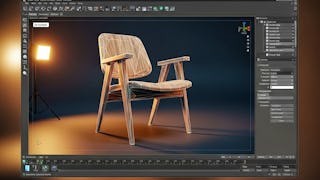
Build a strong foundation in Autodesk 3ds Max architecture and interior modeling through a practical, step-by-step chair design project. You’ll begin by navigating the 3ds Max interface, working with geometry tools, organizing objects, and controlling their position and orientation using axis and rotation tools. You’ll then apply primitives and curve-based modeling techniques to construct chair components, combine and edit objects, manage visibility, and refine each part for accuracy. By the end of the course, you’ll be able to assemble and finalize a complete 3D chair model while following an efficient, precise modeling workflow. Designed for beginners and aspiring interior designers, this course connects essential 3ds Max tools with guided, hands-on practice. Its focused progression—from interface navigation and object control to furniture modeling and final assembly—helps you develop the technical ability and creative confidence needed to create professional interior elements. Enroll to turn your design ideas into accurate 3D models and build a solid base for more advanced 3D visualization projects.
The step-by-step approach makes the interface and modeling tools easy to understand.
This course is perfect for aspiring interior designers and architects starting with 3D modeling.
Showing: 13 of 13
This course was a great introduction to 3ds Max for architectural and interior design work. I had no prior experience, but the step-by-step approach made learning easy. The interface explanation was clear, and the object manipulation exercises helped me gain confidence quickly. Building the chair model from scratch was very satisfying and practical. I now feel comfortable navigating 3ds Max and starting my own interior modeling projects.
I really appreciated the hands-on nature of this course. Each lesson focuses on applying tools immediately, which made learning easier. The interface explanation was clear, and the modeling workflow was logical. Creating a complete chair model helped me understand professional modeling practices. This course is a great foundation for interior and architectural 3D modeling.
This course is well designed for beginners. The instructor explains the 3ds Max interface clearly and focuses on hands-on practice. I liked how each lesson builds on the previous one. The furniture modeling project was practical and easy to relate to real-world design work. After completing the course, I feel confident starting basic architectural and interior models.
This course helped me move from curiosity to confidence with 3ds Max. The interface and object orientation sections were very helpful. I liked how the course didn’t rush into complex models but built skills gradually. The chair modeling project felt realistic and relevant. By the end, I felt comfortable handling objects and creating clean, professional-looking models.
As a design student, I found this course extremely useful. The lessons are structured well and easy to follow. The practical exercises helped me understand how different tools work together. I especially liked the emphasis on accuracy and clean modeling. Completing the chair model gave me a solid foundation for creating other interior elements in 3ds Max.
This course was perfect for someone like me who is new to 3ds Max. The interface navigation and object manipulation lessons were easy to understand. I appreciated how the course focuses on real modeling tasks rather than just tool explanations. Building a complete furniture model helped me apply everything I learned. A great starting point for beginners.
What I liked most about this course is its clear and focused approach. Instead of overwhelming content, it teaches exactly what you need to get started with 3ds Max. The step-by-step chair modeling exercise helped me understand workflow and precision. This course gave me a strong foundation and improved my confidence in using 3ds Max for interior design.
I found this course very practical and well structured. The instructor explains tools clearly and shows how to use them efficiently. The emphasis on precision and clean modeling was very helpful. The chair modeling project felt realistic and relevant to interior design work. This course gave me the confidence to start working on my own 3D design ideas.
This course helped me understand the basics of 3ds Max in a simple and effective way. The lessons are well paced and easy to follow. I liked how the instructor explained object orientation and transformation tools. The final furniture model project tied everything together nicely. It’s a solid course for beginners in architectural visualization.
This course is perfect for aspiring interior designers and architects starting with 3D modeling.
The step-by-step approach makes the interface and modeling tools easy to understand.
I cannot recommend this course to anyone, especially to those seeking a solid foundation in professional or architectural skills. The instructor uses outdated software, which significantly impacts the learning experience. More importantly, the teaching method is completely disorganised. 3ds Max is a precision tool, yet this course treats it like a simple clay project. There is no focus on real-world dimensions, architectural accuracy, or proper workflow. The approach is entirely random, lacking any technical logic. If you're looking to learn how to create designs that work effectively in a production environment, I suggest seeking alternatives. Overall, this course was a waste of time. Additionally, the audio quality is quite poor. Background conversations are constantly audible, making it seem as if the lessons were recorded in a public cafeteria. To further complicate matters, the tutor's voice is either completely unintelligible or so soft that it is barely audible.
It literally teaches nothing. This course should be removed from this site.